
Side Chat
What is Side Chat?
Side Chat is a panel that stays available while you work in AskElephant. Press CMD+K (Mac) or Ctrl+K (Windows) from any page to open it.
Ask questions in plain language across your recorded meetings. Side Chat is built for workflows like:
Self-coaching — "What could I have done better on my last three calls?"
Action items — "What are my open action items from this week?"
Next steps — "Summarize follow-ups from my meetings with Acme Corp."
You do not need to search for meetings and select them individually.
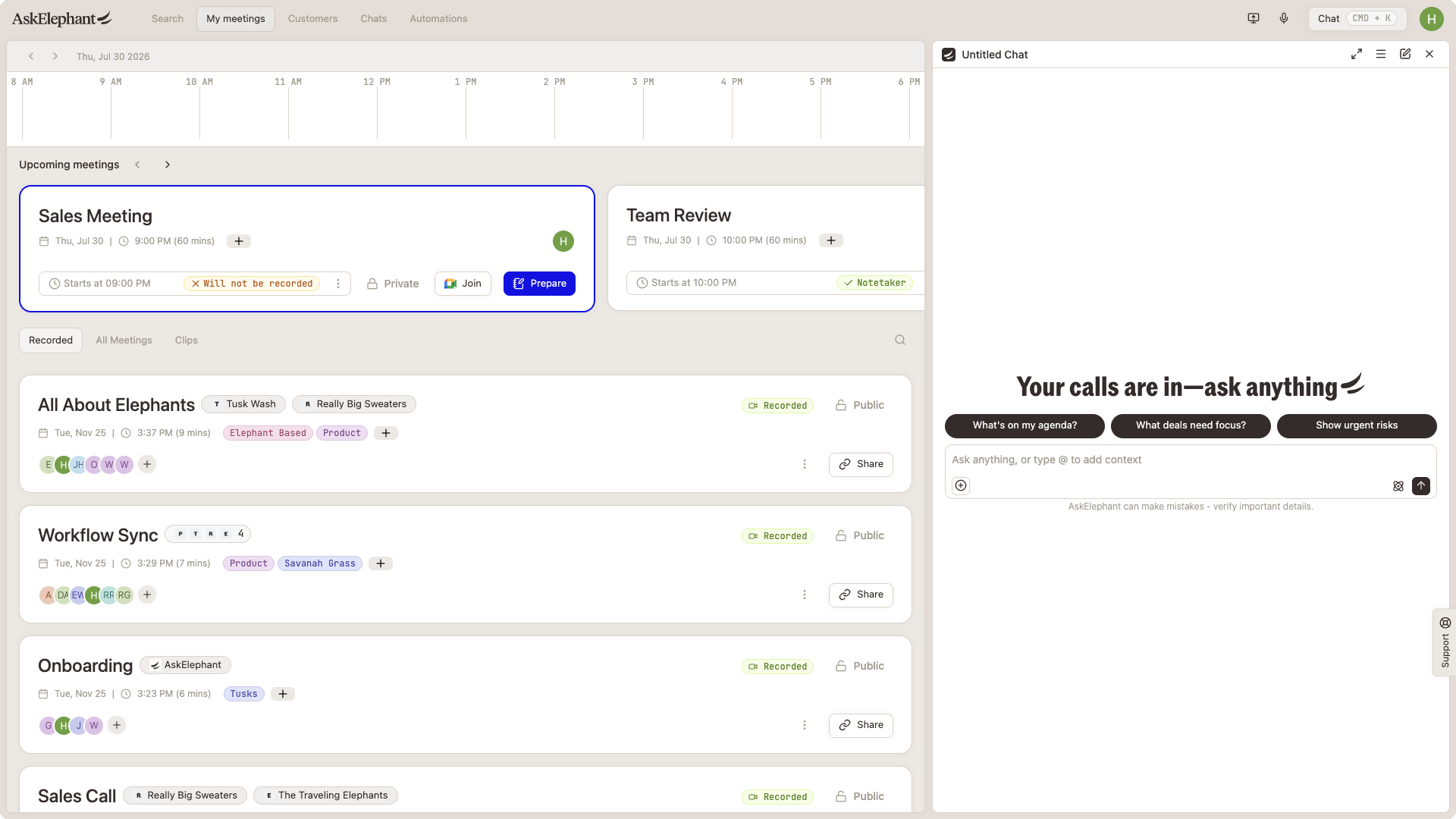
How to open Side Chat
Platform | Shortcut |
|---|---|
Mac | CMD + K |
Windows | Ctrl + K |
You can also open Side Chat from the chat icon in the top navigation.
Tip: Press CMD + Shift + K (Ctrl + Shift + K on Windows) to jump to your most recent chat thread.
Side Chat vs. meeting chat
Side Chat (CMD+K) | Meeting chat rail | |
|---|---|---|
Opens from | Any page | A specific meeting, prep, or home page |
Scope | Across your meetings | That meeting's context |
Best for | Self-coaching, cross-meeting questions | Deep dive on one call |
If you are on a meeting page, you may see a meeting-specific chat rail. Side Chat works everywhere else — and you can use both.
Tips for better answers
Be specific — "What objections came up on my calls with Design Ergonomics this month?" beats "How are my calls?"
Use @ mentions — Type
@to tag a company, contact, or meeting for tighter context.Use the prompt library — Type
/in the composer for saved prompts.Follow up in the same thread — If an answer is too broad, ask a focused follow-up in the same chat.
Turn Side Chat off
If you prefer not to use Side Chat:
Go to Settings → Beta features
Find Side Chat panel (CMD+K)
Toggle Off
You can turn it back on anytime from the same page.
Troubleshooting
I pressed CMD+K and nothing happened
Side Chat may not be enabled for your workspace yet. Contact your AskElephant admin or customer success manager.
Side Chat feels slow or empty
Make sure you have recorded meetings in your workspace. Side Chat works best when you have recent call data to draw from.
I hit a meeting selection limit elsewhere
That limit applies to the older search-and-select chat flow. Side Chat does not require you to pick meetings manually — use CMD+K instead.
Need Additional Help?
Reach our support team by clicking the Support tab on the right side of your screen, emailing [email protected], or using @askelephant support in your dedicated Slack channel.