
Bot Recorder Disclosures
Overview
Bot recorder disclosures let you notify meeting participants that a call is being recorded. You can announce recording three ways: an audio announcement, in-meeting chat messages, and a pre-meeting email. Each type has its own settings, and you can turn all three on or off with a single toggle. Together they help your team stay aligned with government and industry recording-consent rules.
ℹ️ Add-on feature. Bot recorder disclosures are an add-on and aren't enabled for every workspace by default. To add them to your plan, contact your customer success manager (CSM).
Open Bot Recorder Disclosures
To find the settings:
Click your profile icon in the top right of the navbar.
Select
Workspace Settings.Go to
Bot Recorder Disclosures.
Audio Announcements
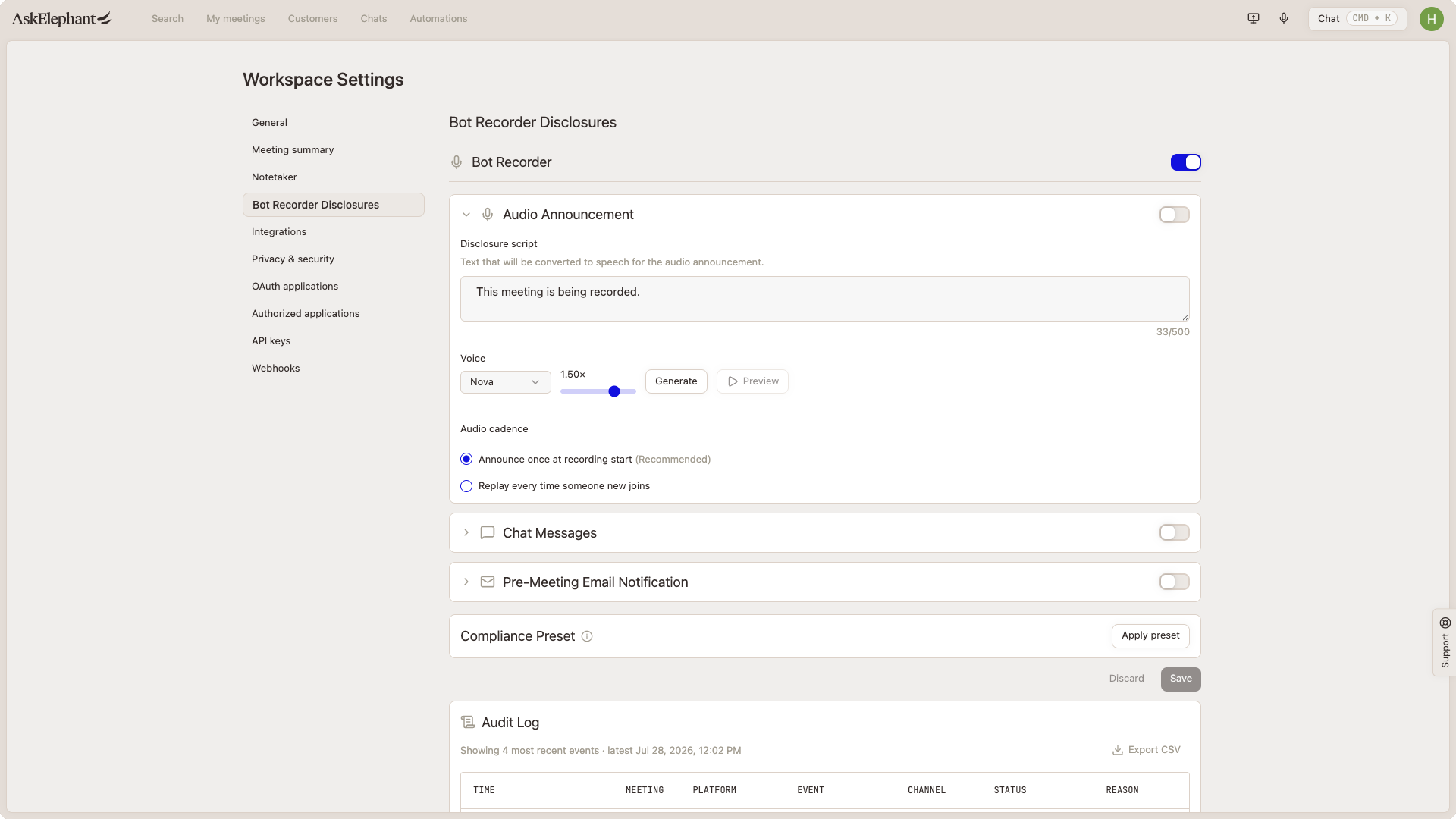
An audio announcement plays a spoken message at the start of a recorded call. You control:
Message. Write what participants hear, up to 500 characters.
Voice. Choose one of three voices.
Speed. Set playback from slow up to 1.75x.
Cadence. Play the announcement once at the start of recording, or every time a new person joins.
Generate a short preview to hear the announcement before you turn it on.
Chat Messages
Chat messages post a disclosure in the meeting chat at the moments you choose: when a participant joins, when the notetaker joins, when the notetaker is paused, and when it resumes. Each message holds up to 4,096 characters. A preview appears directly below the text input as you type.
Pre-Meeting Email Notification
This option emails participants before the meeting starts. Set the email subject (up to 200 characters) and the body template (up to 4,000 characters), and insert variables for the meeting title and workspace name to personalize each message.
Choose when the email sends: anywhere from one week before the meeting to one hour before, with a default of 24 hours. Preview the email before you turn it on.
Compliance Preset
The compliance preset helps your disclosures meet the timing requirements of regulations like FERPA and HIPAA, along with other government and industry rules that call for earlier or repeated recording consent. Use it when a customer or industry expects a stricter standard.
Audit Log
The audit log records every recording disclosure as it happens. Each time a disclosure plays, posts, or sends, it appears in the log so you can confirm participants were notified.
Need Additional Help?
If you have questions or need further assistance, the AskElephant support team is here to help!
You can reach our support team in several ways:
click the Support tab on the right side of your screen,
email us at [email protected],
or use
@askelephant supportin your dedicated Slack channel.
We're committed to getting you the answers you need as quickly as possible.