
Mobile & Desktop App
Introduction
AskElephant's web platform is powerful on its own, but you don't have to stay at your desk to use it. The mobile and desktop apps extend your AskElephant experience wherever you are — letting you capture meetings, stay on top of your schedule, and access your insights from any location or device. Whether you're in back-to-back meetings, working from a coffee shop, or juggling multiple projects at once, these companion apps make sure you're never out of the loop.
Key Terms
Engagement: A meeting, call, or conversation with a customer or colleague that you record and store in AskElephant.
Workspace: Your personal hub in AskElephant where all your engagements, recordings, and team collaboration happen.
Note-taker: An AI-powered assistant that joins your meeting to capture key points and create a transcript automatically.
The Mobile App: Capture Meetings On the Go
The AskElephant mobile app (available on iOS and Android) turns your phone into a portable meeting hub.
What you can do:
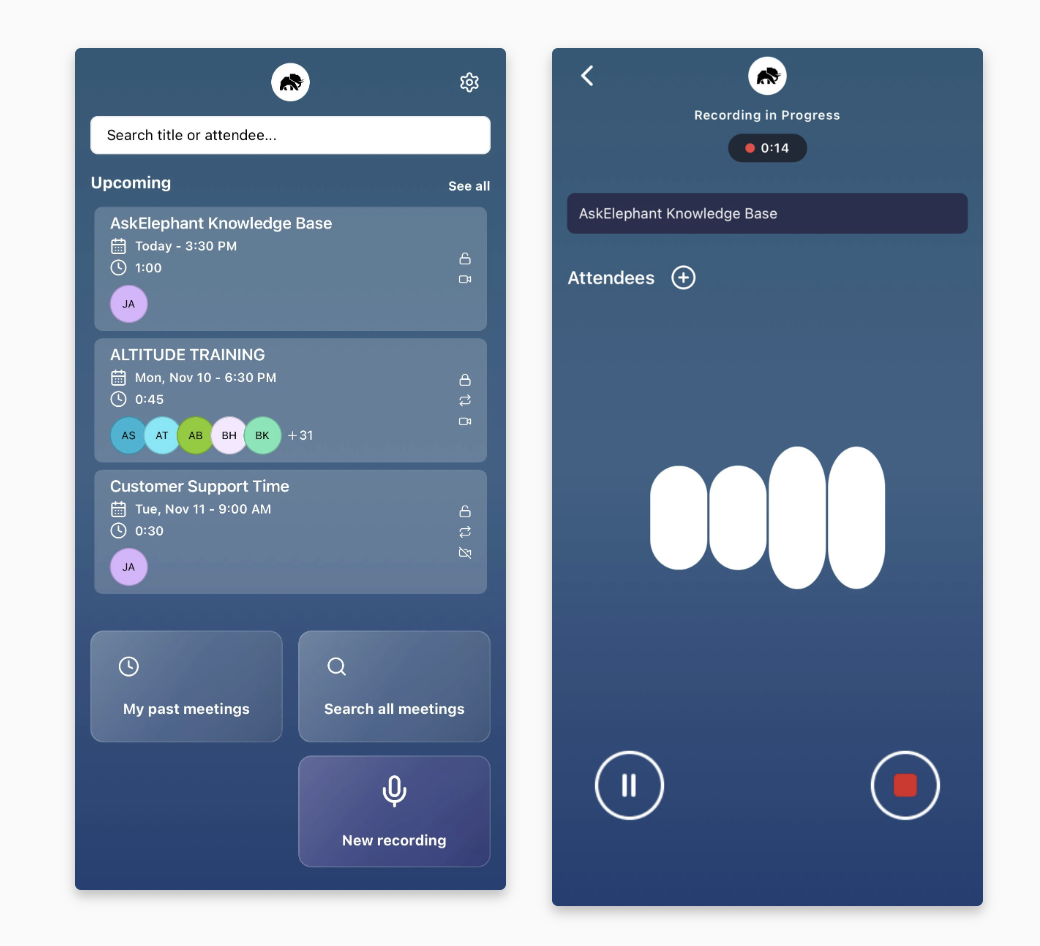
View your schedule: See upcoming meetings with dates, times, associated companies, and attendees.
Record anywhere: Start a new recording with one tap, whether you're in a formal conference room or catching a spontaneous business conversation at lunch.
Access past engagements: Search through all your previous meetings by name, view audio and video recordings, check transcripts, and read participant details.
Collaborate in real time: Chat about engagements on the go and share content with coworkers or external contacts.
Trigger workflows: Start new conversations or actions based on workflows connected to specific meetings.
The biggest advantage? You don't need to wait until you're back at your desk. The moment a meeting ends, your recording automatically uploads to your workspace — no manual steps required.
Recording Phone Calls on Mobile
The mobile app records in-person conversations and ambient audio around your phone. It can't record phone calls, whether regular cellular calls or calls placed through Google Voice or another VoIP app. Mobile operating systems block apps from capturing phone-call audio. To capture a call, host it as an online meeting in Zoom, Teams, or Google Meet and send the notetaker.
The Desktop App: Stay Aware While You Work
The AskElephant desktop app keeps you informed without interrupting your workflow.
What you can do:
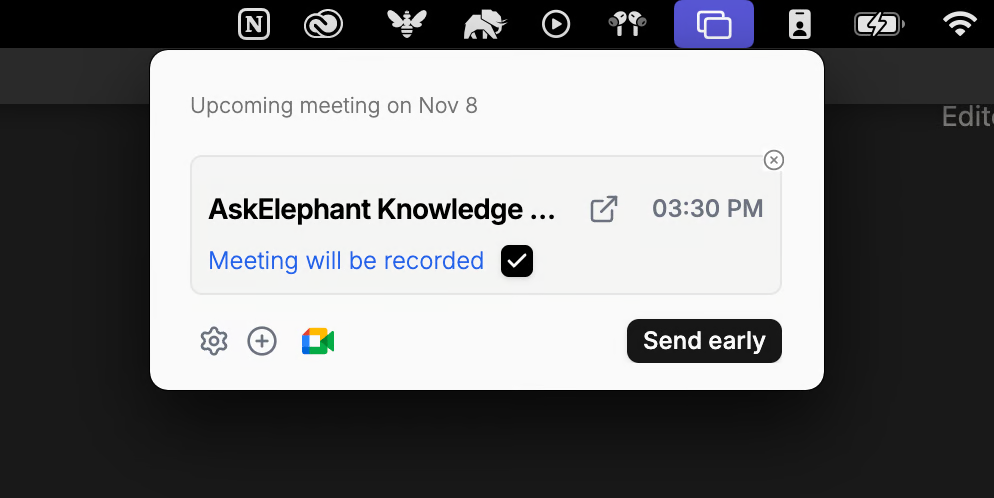
Get meeting notifications: Receive alerts about upcoming engagements, even while focused on other work (like writing in a document or updating your CRM).
Send your note-taker: Dispatch an AI note-taker directly to a meeting from a simple desktop popup.
Join meetings instantly: Click straight into a meeting from the notification — no need to hunt for the link.
Manage settings: Control notification preferences and meeting settings from the app.
Stay informed: See whether your upcoming engagement will be recorded and who's attending.
The desktop app is designed for people who juggle multiple tasks. Get a gentle nudge about your next meeting, make sure your note-taker is ready, and keep moving forward — all without breaking concentration.
How It All Works Together
Think of it this way:
Mobile app = Your always-on recording tool for capturing conversations and insights anywhere.
Desktop app = Your meeting management assistant for staying organized while you work.
Together, they ensure you're capturing every important engagement and never miss a scheduled meeting — whether you're at your desk or across the country.
Next Steps
Start by downloading the AskElephant app that fits your workflow best. If you spend time away from your desk, grab the mobile app first. If you want better meeting notifications while working, the desktop app is your answer. Or get both — they work seamlessly together.
Have questions about setting up or using either app? Connect with the Herd in our community forum for tips and best practices from others in the AskElephant community.
Need Additional Help?
If you have questions or need further assistance, the AskElephant support team is here to help!
You can reach our support team in several ways:
click the Support tab on the right side of your screen,
email us at [email protected],
or use
@askelephant supportin your dedicated Slack channel.
We're committed to getting you the answers you need as quickly as possible.